
Share a project: roles, credits and invites
Invite people to one project as a Commenter or Editor, control whether they can spend its credits, and share a view-only link.
Last updated October 10, 2026Share (top-right of any project) is for bringing in people outside your workspace, or giving someone narrower access than full membership. It's different from inviting a teammate: workspace members already have full edit access to every project — Share is per-project.
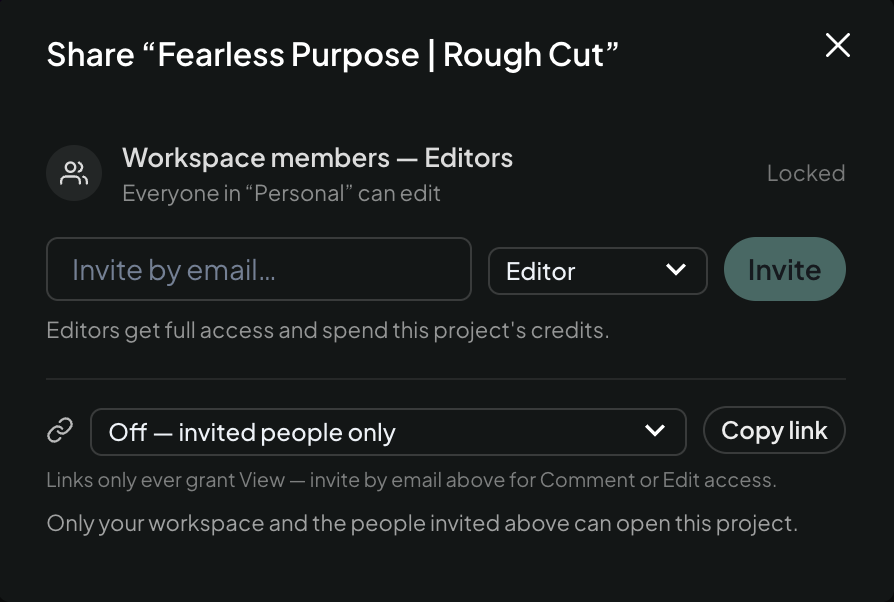
Two ways to share
- Invite by email — type an email, pick a role, click Invite. They get an invite email and gain access once they sign in with that address.
- Copy a link — turn link sharing on ("Anyone with link can view") and copy it. Links are always view-only, no matter who opens them — for Comment or Edit access, invite that person by email instead.
Roles
- Commenter — can watch the cut and leave timeline comments and feedback. Can't edit the timeline and doesn't spend credits.
- Editor — full access: prompt Eddie, change the edit, export. Editors spend this project's credits when they do — the modal says so plainly before you invite one, so you know who's drawing on the balance.
Workspace members show as a locked "Workspace members — Editors" row at the top of the modal — that access comes from workspace membership, not from this screen; manage it via workspace members instead.
Invite emails
Invited people get an email with a link straight into the project. If they haven't opened it, Eddie sends one reminder after about 72 hours — after that, it's on you to nudge them.
Good uses
- Bring in a client or reviewer as a Commenter — see Eddie implements your comments for how their feedback can flow straight into edits, and Comment emails and comment links for how you hear about new comments.
- Bring in a freelance editor on one project without giving them your whole workspace.
- Share a view-only link for a quick look with no sign-up required on their end.
Related: Invite and manage teammates, What everyone in a workspace can see and spend.
Still stuck?
For a product issue, or for billing and your account, see Contact support. Cutting with a team or at studio volume? Talk to sales.