
Download interview and B-roll logs
Before you even start an edit, download the A-roll interview outline or B-roll shot log as a Final Cut/Premiere/Resolve timeline, CSV, Word doc, or straight into Google Drive.
Last updated September 9, 2026As soon as Eddie has logged your footage — before you've prompted a single edit — you can download that log to work with outside Eddie.
Where
Open a project that hasn't had an edit generated yet: you'll see an Interview Logs panel (the A-roll outline, one entry per interview with its title, summary and timestamped sections) with an Export button next to the heading.
What you can download
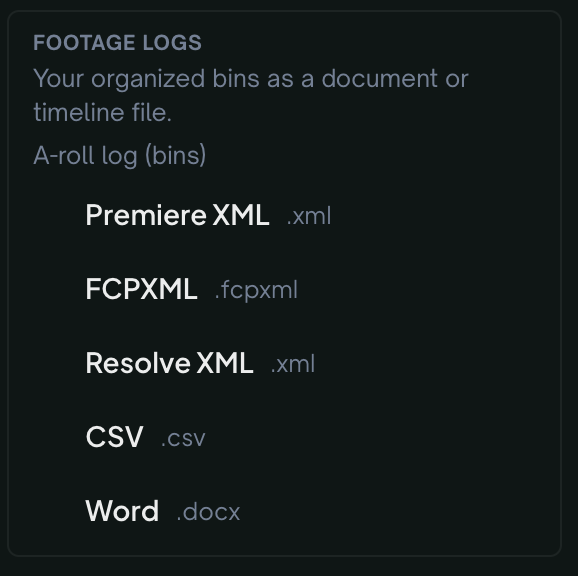
The Export menu is grouped by A-roll Logs and B-roll Logs (each group only appears once that log actually exists — you'll never be offered a download that comes back empty):
- Final Cut Pro (FCPXML), Adobe Premiere Pro (XML), DaVinci Resolve (XML) — a timeline/bin your NLE can open directly, structured from the log (not baked video — see Export to Premiere, Final Cut, Resolve, Avid & OTIO for what NLE exports generally contain).
- CSV — a spreadsheet of the log.
- Word (.docx) — a formatted document.
- Save to Google Drive as Doc or as Sheet — uploads straight to your Drive (via a one-time Google sign-in the first time you use it) and opens it as a native Google Doc or Sheet, no download-then-upload step.
Good to know
- This is a log (structure, summaries, timestamps) — not a rendered video. For the finished video, see Render an MP4.
- A-roll logs are the interview outline; B-roll logs are your b-roll shot summaries — see Add B-roll for how those get generated.
- Projects under 90 minutes of A-roll skip logging at import. If the A-roll rows show Generate footage logs instead of formats, click it — free, a few minutes. See Footage logs for smaller projects are generated on demand.
- Once you've started an edit, this panel is replaced by the edit view — the logs still exist, they're just reached differently (ask Eddie for a log via transcripts and search instead).
Still stuck?
For a product issue, or for billing and your account, see Contact support. Cutting with a team or at studio volume? Talk to sales.