
How credits and billing work
Credits pay for imports, prompts and generation — from your personal balance or the workspace's shared pool.
Last updated October 21, 2026Watch this in EddieU
How Credits Work in Eddie AI v4 | EddieU
What uses credits in Eddie v4, how charges are presented, and how to plan a project around your balance.
Credits are how you pay for the work Eddie does on your footage.
What spends credits
- Imports — transcription and analysis of your footage.
- Prompts — the editing work Eddie does when you direct it.
- Generation — motion graphics, sound effects, AI music, voice-over, dubbing and AI b-roll. Prices for each are in Generate with Eddie.
- Placing b-roll on a cut — priced on the b-roll files the cut uses, whichever supply they came from. See Add b-roll and overlays.
- Analysis — extra passes like having Eddie watch a render and give feedback.
Costs are shown as they're incurred, and your balance is always visible in the sidebar (Credits · Buy).
Imports are billed on measured footage
Imports cost 250 credits per hour of source footage, billed in 15-minute blocks (15-minute minimum, so the smallest import is 63 credits). When Eddie can't know a file's length up front — cloud picks from Drive, Dropbox, Frame.io, iconik or LucidLink, and camera formats the browser can't probe — the import screen's cost meter says "cost TBD — based on footage length" instead of guessing. The exact cost is settled once the footage is measured during the import: if an estimate was held up front, over-estimates are refunded automatically and only the measured length is charged.
What a prompt run costs
A prompt run is metered on the work it actually does, so there is no flat fee — but there is a typical range. Most runs land between about 80 and 380 credits. A big first assembly across hours of footage costs more; a small fix costs less. Eddie quotes a range for your specific run before it starts, and every finished run shows what it cost.
Every tool's cost is explicit
Most of what Eddie does from a prompt is free — cuts, trims, captions and titles cost nothing beyond the prompt itself. A few things do cost credits: music and voice generation, stabilization, cleaning up noisy audio (see Audio cleanup), Eddie analyzing and reviewing a render, and placing b-roll on a cut (350 credits per hour of the b-roll files that cut uses, each file counted once and charged once per edit — see Add b-roll and overlays). If you tell Eddie a cost condition — "only if it's free," "ask me first if this costs anything," "how much will this be?" — it checks the price before doing any paid work and won't spend without your OK, naming what it skipped and what it would have cost.
Exports
Sending a finished timeline to your NLE costs 100 credits per export, the same on the web, in the desktop app and through the Eddie MCP tools. One artifact, one price, wherever you produce it. Nothing is charged if the export fails to build.
That one price covers every format Eddie hands over, including the two native project files: a Premiere Pro .prproj and a DaVinci Resolve .drp, which open directly in those apps rather than needing an import step. Both are real, supported exports — find them in Export ▸ All export options as "Premiere project" and "Resolve 21 project". The interchange formats cost the same 100: the legacy Premiere .xml, FCPXML (Final Cut, and the Resolve flavour) and OTIO.
10 cloud MP4 exports a day are included for each workspace (the day resets at midnight UTC); after that each costs 50 credits.
A flat 10 credits covers the desktop app's local MP4 render and sending a finished MP4 to Frame.io or iconik. ProRes 4444 renders cost 300, because those are a real render rather than a timeline file Eddie writes out.
An audio description costs 200 credits a minute of the edit, in whole minutes, with a one-minute minimum. Eddie tells you the price before it starts, and the pauses it adds are free.
If something fails, you're refunded automatically
If an Eddie AI task fails on our side — a render, an analysis, a generation — you get a plain-language notice in the project chat and your credits back, not silence and a missing balance.
Questions, complaints and corrections
- A question costs nothing. If you ask Eddie something or tell it what is wrong, and it changes nothing in your project, the turn is free. Eddie does not show you a build quote for it either. If the same message also asks for a rebuild and Eddie does the work, that work is billed as usual.
- One correction of a fresh result is covered. If you ask Eddie to put right the edit it just delivered, within 30 minutes, the correction draws on what you already paid for that run instead of being billed again. This holds after you rename the edit, or after Eddie combines chapter edits into one cut. It covers one correction per run, up to what that run cost.
Personal vs. workspace credits
- In your personal space, activity spends your own balance.
- In a workspace, everyone's activity spends the workspace's shared pool — see workspace visibility and spending.
Buying credits
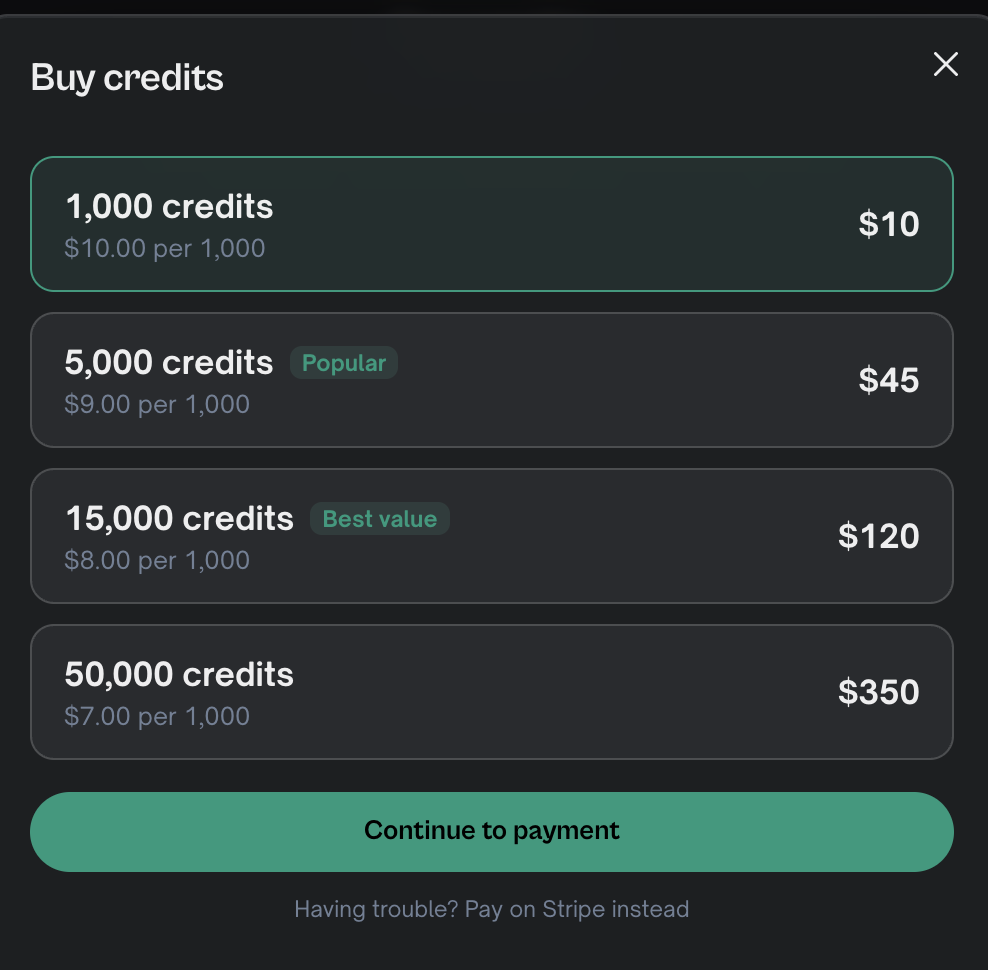
Click Buy next to your credit balance — or go straight to the buy-credits page — and choose an amount. Buying from a team workspace's sidebar tops up that workspace's pool. The direct buy-credits page works the same way if you belong to just one workspace; if you belong to more than one, it shows a picker so you choose which one to fund — it isn't always your personal space, so check which balance is selected before paying. Credits are shared across web, desktop and MCP clients — one account, one balance (or one workspace pool).
Running low
If a workspace runs out of credits, imports and prompts pause until the balance is topped up. Projects and edits aren't lost — everything resumes when credits are available.
Starting out
New accounts begin with 500 free credits — enough to import about two hours of footage, or an hour of footage and a short edit of it. Importing is the first cost. An edit is a separate cost that Eddie quotes before it starts, and it depends mostly on how long a cut you ask for: a full-length cut of a long shoot can cost more than the import. If you have many hours of footage, you can start with part of the shoot.
Earn credits by referring friends
Share your referral link from your referral page. When a friend signs up with it and finishes their first import, you get 250 credits and they get 250 extra credits, for up to 10 friends. See Refer a friend and earn credits.
What's free
- Most prompt work. Cuts, trims, captions and titles cost nothing beyond the prompt itself.
- Questions. Asking Eddie a question, or telling it what is wrong, costs nothing when it changes nothing. That includes questions about your credits or your bill.
- One correction of a fresh result. See Questions, complaints and corrections above.
Still stuck?
For a product issue, or for billing and your account, see Contact support. Cutting with a team or at studio volume? Talk to sales.