
Render a finished MP4
Render the finished video in the cloud, in 1080p or 4K, up to 60 minutes long, or with no length limit on desktop.
Last updated October 10, 2026When you want a finished video rather than a project file, Eddie renders your edit to MP4 with everything baked in: cuts, color, crops, titles, captions (word-level highlight included), motion graphics, b-roll overlays, music with auto-ducking and voice-over.
On the web (cloud render)
Ask Eddie to export an MP4, or use the Export options — the render runs in the cloud from the files Eddie received when you imported, and returns a download link. A render typically takes a minute or two.
For a web or cloud-storage import, that is your original file. For an import from the desktop app, it is the working copy the desktop app uploaded, so the picture is no sharper than your Proxy Resolution setting. The working copy does not change where the sound comes from: a cloud MP4 follows every audio choice in your edit, such as taking the sound from a separate recorder.
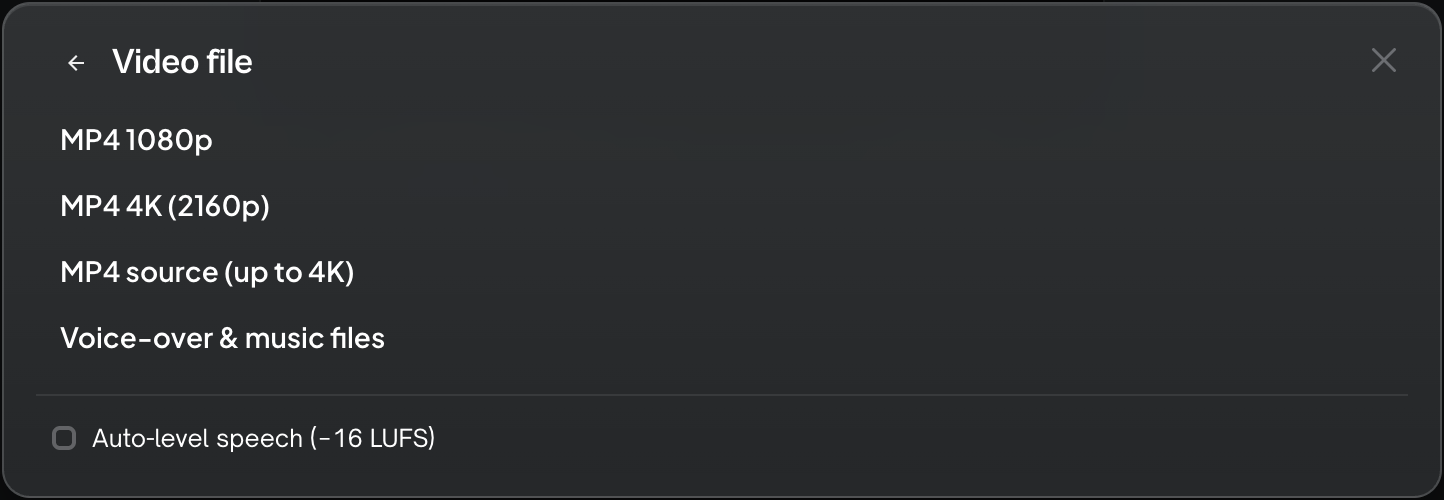
1080p, 4K or source
In Export ▸ All export options… ▸ Video file, pick MP4 · 1080p, MP4 · 4K (2160p) or MP4 · source. All three cost the same. Motion graphics are drawn at the output size, so a graphics-only project exports at true 4K.
A 4K export of footage shot below 4K still gives you a 4K file. The picture holds the detail the camera recorded, and Eddie tells you when it scaled footage up to fill the frame. To raise the picture itself, use MP4 · 4K upscaled below.
There is no daily limit on cloud MP4 exports. For what they cost, see How credits work. Re-downloading an unchanged edit comes from cache and doesn't count as an export. These limits apply:
- 60 minutes maximum output length. Eddie checks the length before anything starts, so a refused export never costs you anything.
- One render at a time per workspace.
The 60-minute limit applies to the cloud MP4 render only. It does not apply to timeline exports, and it does not apply to a render on desktop.
Keep the file under a size limit
Some places refuse a file over a set size: an upload form, an email attachment, a client portal. You can tell Eddie the largest file you can send.
- In Export options: under MP4 · 1080p, tick Limit file size to and type the limit in MB. The row then shows the limit, for example "under 500 MB".
- By asking Eddie: say "export an MP4 under 25 MB", or any size you need.
What happens:
- Eddie lowers the picture's bitrate evenly across the whole edit, so the file lands under the limit. The sound is not reduced.
- If the full-quality file already fits, nothing changes. You get the same file as an export with no limit.
- If the limit is too small for the edit to stay watchable, the export stops before it starts. Eddie tells you the smallest size that works for this edit. Type that size, or shorten the edit. Nothing is rendered and nothing is charged.
A megabyte here is 1,000,000 bytes. That is the smaller of the two common meanings, so the file also fits a limit that counts a megabyte as 1,048,576 bytes.
A smaller file has less detail, most of all in fast motion. For the best picture at a given size, keep the limit as high as the destination allows.
Upscale to 4K
MP4 · 4K upscaled is a row in the same Export options list. Pick it when your footage is below 4K and you want a sharper 4K file rather than a larger one. Eddie upscales every clip that needs it, then renders the finished 4K MP4. One click, one file.
This row costs credits. It shows its price on the row before you click, and that price covers the whole job — the render itself adds nothing to it.
What to expect:
- It finishes after you leave. Each clip takes a few minutes at the upscaler, and the render starts once every clip is done. Nothing on your timeline changes while it runs.
- A clip Eddie already upscaled is reused free. You are never charged twice for the same clip.
- A clip that fails is named, never hidden. The export still delivers, and Eddie tells you which clips carry the original picture. You are not charged for a clip that doesn't arrive.
- One upscaled export per edit at a time.
- The 60-minute limit applies here too. This row ends in the same cloud render.
An upscale raises resolution. It cannot put back detail the camera never recorded.
If a render seems stuck
Most renders finish in a minute or two. If a cloud render has not finished two hours after it started, Eddie checks it one last time. If the file is ready, you get it. If not, Eddie ends the render and tells you, and a paid MP4 export gets its credits back. Then start the export again from the Export menu.
If your edit runs longer than 60 minutes
Eddie checks the length before it starts. In the Export options, the MP4 rows are disabled, and each one shows how long your edit runs next to the limit. The rows that send an MP4 to Frame.io or iconik are disabled for the same reason.
Choose one of these instead:
- Export a timeline to Premiere Pro, Final Cut Pro, DaVinci Resolve, Avid or OpenTimelineIO, then render it in your own editor. Timeline exports have no length limit, and this route works for every project.
- Render on desktop. The desktop app has no length limit. It renders from the source files on that computer, so use it only for a project whose footage is on the same machine. A project you imported from cloud storage has no local files to render from.
- Split the edit. Make two or more shorter edits from the same project, then render each one.
On desktop (local render)
The desktop app renders on your machine from your local source footage — no length limit, no daily quota, and no dependence on upload quality. It's the best path for long edits and final masters.
Older versions of Eddie for Mac leave motion graphics and sound effects out of a local MP4 export — update Eddie for Mac, or export in the cloud.
Versions of the desktop app before 4.0.25 play each camera's own sound where your edit takes the sound from a separate recorder file. If a desktop MP4 has the wrong sound, update the app, or export a cloud MP4 to check what your edit is set to.
Sound levels
The Video file destination has two audio settings:
- Auto-level speech (−16 LUFS) evens out the dialogue between sources. It is on by default when the edit uses more than one A-roll source.
- Final loudness sets the level of the whole finished mix. The default is Web & social (−14 LUFS). You can choose broadcast EBU R128 (−23 LUFS), broadcast US ATSC A/85 (−24 LKFS), or off.
See Music, voice-over and audio for details.
An edit made only from audio renders as a black picture with your sound. See Edit a podcast or other audio-only recording.
Vertical and square
Titles and captions are sized and wrapped for the canvas, so reframed vertical and square edits render correctly.
Prefer to finish in your own editor? Export a timeline instead.
Still stuck?
For a product issue, or for billing and your account, see Contact support. Cutting with a team or at studio volume? Talk to sales.