



Eddie AI

Programmatic video editing

Give your agents a video editor.

A CLI, a headless SDK and an MCP server. Point an agent at raw footage; it cuts, captions, scores and exports to Premiere, Resolve or MP4.

Terminal
sk_live_ keyNode 18+@eddieai/cli

Three ways in

One editor. CLI, SDK and MCP.

CLI

Drive it from a shell

Create, import, prompt and export in four commands. Progress on stderr, ids on stdout.

# capture just the id
id=$(eddie new \
  --import ./footage/*.mov)
eddie prompt "$id" \
  "make a 6min rough cut"
eddie export "$id" \
  "Rough Cut" --format mp4

SDK

Embed it in your backend

A dependency-free core: Node built-ins and fetch. Trade an sk_ key for a short-lived token.

import { Eddie } from
  "@eddieai/cli/dist/sdk.js"
const eddie = new Eddie({ apiKey: key })
const { shareId } =
  await eddie.createAndImport({ files })
for await (const ev of eddie.prompt(shareId,
  "cut the best 10 minutes")) { /* stream it */ }
MCP

Hand it to an agent

Connect Claude or any MCP client and every editing action becomes a typed tool.

// .mcp.json — no key, the client signs in
"eddie": {
  "type": "http",
  "url": "https://mcp.heyeddie.ai/api/mcp"
}

Uploads go straight to S3 with a presigned URL. The key never holds cloud credentials.

Humans + AI, one project

Where editors and agents co-create.

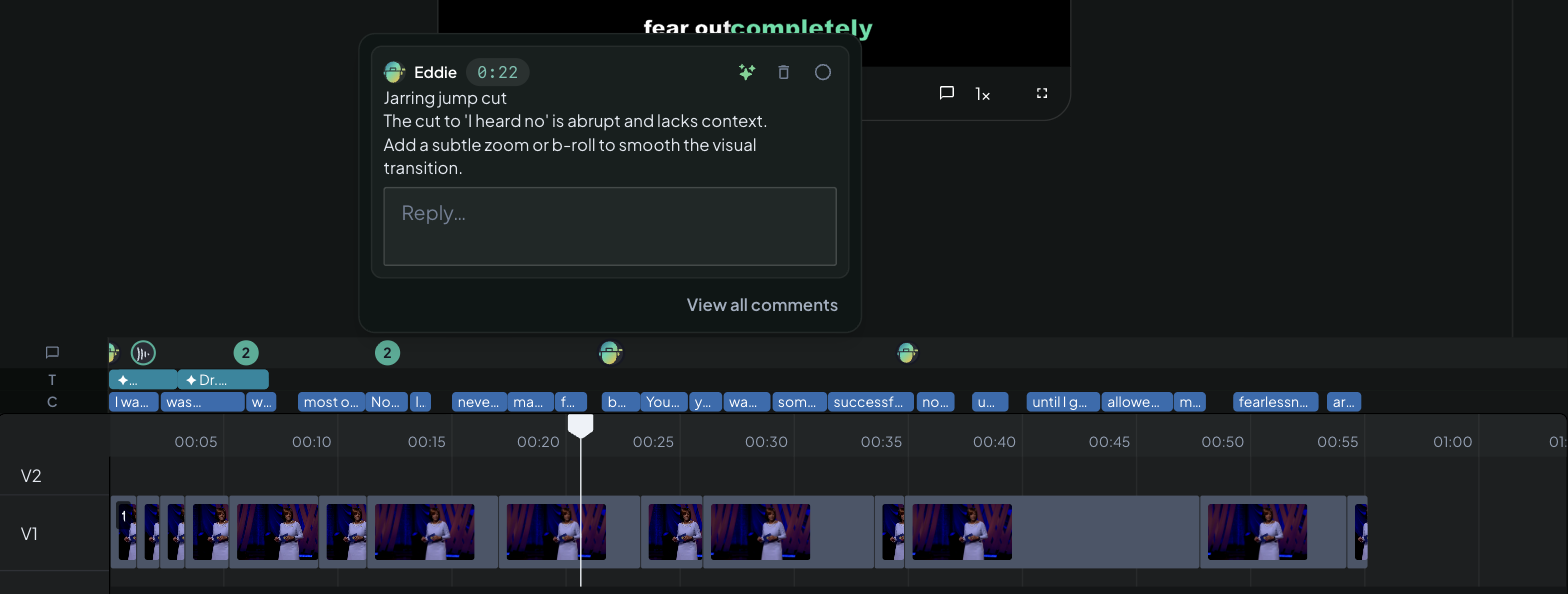
A shared Eddie timeline with Eddie's comment on a jump cut, open for a reply

The agent

does the work

  • Picks the strongest soundbites from every transcript
  • Builds to a deliberate target length
  • Adds captions, music, b-roll and speaker titles from one prompt
  • Reports how much footage it used, and what it skipped

The human

stays in control

  • Opens a share link and watches the cut, no install
  • Comments and re-prompts in plain language
  • Nudges one cut, angle or caption; the rest stays put
  • Finishes in Premiere, Resolve or Final Cut

The agent proposes. The human disposes. The project is the shared surface.

The tool surface

A real editor’s toolbox, as typed tools.

01Build

  • create_edit_result
  • create_video_sequence
  • find_transcript_segments
  • layout_edit
  • add_break

02Refine

  • add_captions
  • add_music_track
  • add_brolls
  • set_multicam_angles
  • correct_transcript
  • trim_segment
  • analyze_edit

03Deliver

  • export_edit
  • export_selects
  • build_document
  • get_credit_balance
  • list_edits
  • get_transcript

118 public tools in all. See every tool

From prompt to render

Async by design.

A prompt run is server-driven: start it, then stream each editorial step as it lands.

  1. Import

    Presigned S3 upload and ffprobe. Sources analyse in parallel.

  2. Prompt

    The agent reads transcripts, picks soundbites, builds to a chosen length.

  3. Refine

    Captions, music, b-roll, angles, dubs. Each a scoped call.

  4. Deliver

    An MP4, or Premiere, Resolve and Final Cut. Cuts relink to the originals.

What it can do today

Broadcast-grade moves, one call each.

  • Multicam

    Syncs angles from shared audio and cuts to whoever is speaking.

  • Captions & dubs

    Karaoke-accurate captions, and dubs into 30+ languages that re-caption themselves.

  • B-roll

    Finds coverage across the project, or generates and places subclips.

  • NLE export

    Generated server-side, cuts intact.

    FCPXML · .prproj · .drp · OTIO

  • Social

    Best soundbites to 9:16 with smart reframing, and 16:9 from the same edit.

  • Talk to footage

    Find moments, pull selects, build a shot log or a Word doc.

Build with Eddie.

Mint a workspace key, install the CLI, and put an editor in your agent’s hands in five minutes.

npm i -g @eddieai/clieddie loginSettingsIntegrationsAPI keys

Looking for named editing agents you add inside Eddie instead? Browse the agent marketplace