

What's new in Eddie 3.5
Rebuilt from the ground up: projects live in the cloud, your team can work in them, Eddie carries the edit far further into post, and you can drive it from Claude. Old projects don't migrate.
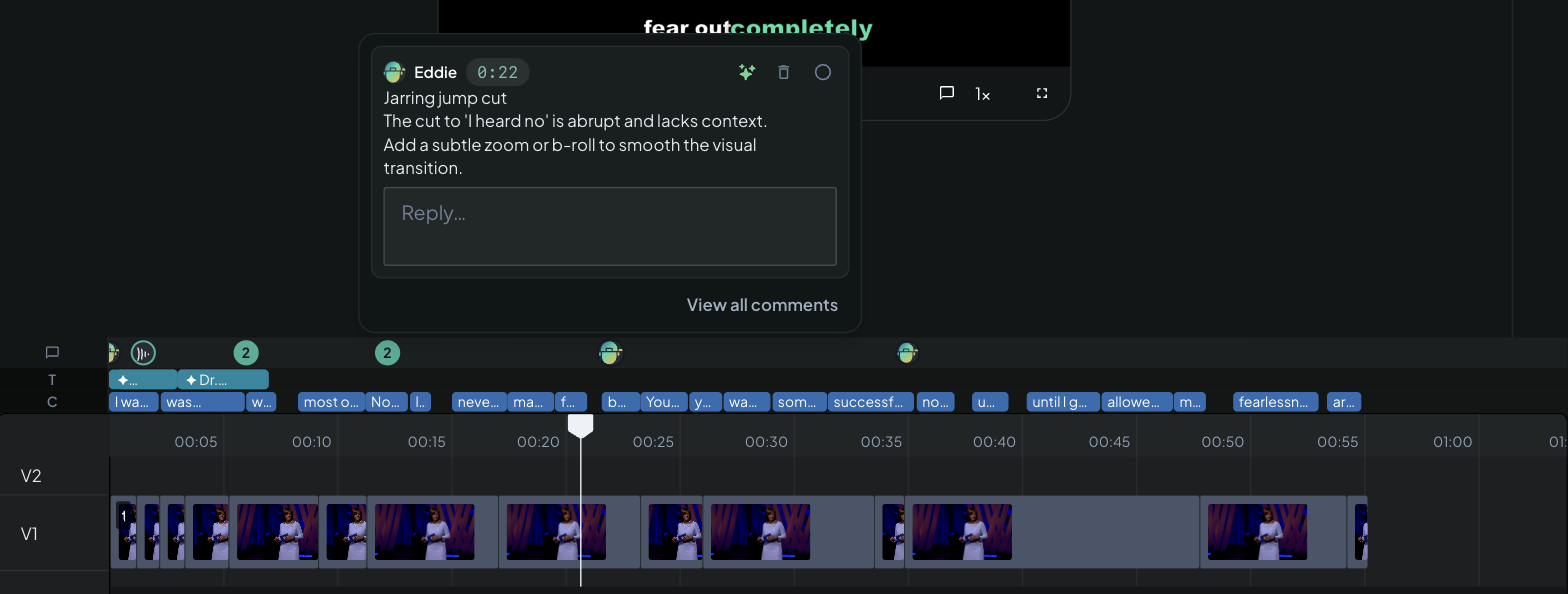
Eddie 3.5 is not an update to the Eddie you've been using — it's a new editor, rebuilt from the ground up, and it can do far more. Here's what actually changed, and exactly what moving over means for your projects and credits.
Your projects live in the cloud
This is the change everything else rests on. Original Eddie was a desktop app: a project lived on one machine, and that machine was where the work had to happen.
In 3.5 the project itself lives in the cloud. Sign in and it's there — in the web app, in the Mac or Windows desktop app, on your iPhone, or in an AI chat. Move between them mid-edit and it's the same project, not a copy or an export: hand a web project to desktop for native playback and uncapped local MP4 rendering (Open in the desktop app), and everything you did on the web is already there.
Nothing to sync, nothing to keep track of, and nothing lost when a laptop dies.
Other people can work in your projects
Because projects live in the cloud, editing stops being a solo activity.
- Workspaces — a shared home for your team's projects and a shared credit balance. See Create a workspace and Invite and manage teammates.
- Per-project sharing with real roles — invite a client as a Commenter (can watch and give notes, can't edit, can't spend credits) or a freelancer as an Editor on one project without handing over your whole workspace. Or copy a view-only link that needs no sign-up. See Share a project.
- Comments on the timeline — including Eddie's own. You and your reviewers drop timestamped notes right on the cut, and you can ask Eddie to watch the edit and leave its feedback the same way. Every comment carries a ✨ spark that turns it into an instruction Eddie implements. See The ✨ spark.
- A full Frame.io round-trip — send a cut to Frame.io and reviewer comments flow back onto your Eddie timeline, ready to implement. See Send to Frame.io.
Drive Eddie from Claude, or any AI chat
Eddie 3.5 is built on MCP (Model Context Protocol), so Eddie isn't only a website — it's a tool your AI assistant can use. Add one connector in Claude, ChatGPT or any MCP client and your chat becomes the edit bay: "list my Eddie projects", "cut project X to a two-minute highlight, add captions, and send me an MP4."
Same projects, same credits, same footage as the web app. See Use Eddie from Claude or ChatGPT.
Eddie goes much further into post
Original Eddie found the good material and handed you an assembly. 3.5 keeps going — roughly ten times the editing capability, and most of it is work you'd previously have taken to Premiere or Resolve. Five examples:
- Word-level captions — timed off the transcript, so each word can highlight as it's spoken. Styled by prompt, burned into MP4 renders, and the timing carries into your NLE. See Captions and subtitles.
- Music that gets out of the way — describe the soundtrack you want, Eddie generates it and ducks it automatically under speech. See Music, voice-over and audio.
- Titles and graphics — lower thirds, name supers and logos placed on the cut, from your brand kit where you have one. See Titles and graphics and Motion graphics.
- Reframe for social — turn a 16:9 shoot into a vertical or square cut, cropping each shot to keep the subject in frame, with captions and titles reflowed to the new canvas. See Crop and reframe.
- Voice-over — ask for spoken lines and Eddie generates them as AI voice-over clips placed where you say: an intro, links between sections, an outro. See Music, voice-over and audio.
And color grading, filler and silence removal, b-roll, multicam angle switching — all directed in plain language. See What can you ask for?.
More ways to get the work out
- Timelines for Premiere Pro, Final Cut Pro, DaVinci Resolve, Avid (EDL) and OTIO. See Export to your editor.
- A finished MP4 with a download link — or render locally on desktop with no length cap. See Render an MP4.
- Logs and documents — the interview outline and b-roll shot log as CSV, a Word doc, an NLE bin, or straight into Google Drive as a Doc or Sheet — before you've cut a frame. See Download logs.
- To Frame.io, for review. See Send to Frame.io.
What got better
Not everything here is brand new — some of it is the thing you already relied on, done properly.
Hand-off to your NLE was always the point of Eddie, and it still is. What changed:
- Send an edit straight into Premiere Pro or DaVinci Resolve — one click, no manual relinking dance.
- It runs both directions now — bring a timeline back in from your NLE. See Import from your NLE.
- Exports are more faithful. Sequences take their resolution and frame rate from your source footage rather than from a proxy, so a 4K 23.976 shoot exports as a 4K 23.976 timeline.
- Multicam exports are checked before they leave. If an edit cuts to a point where no camera angle actually has footage, Eddie refuses the export and tells you where, instead of handing you a timeline that plays black.
Captions and transcripts: a plain caption style with no animation, for when the moving-word look is wrong for the piece; Hindi captions; captions on voice-over and silent b-roll edits, which previously had nothing to caption from; and transcribe a source on demand — if a file came in without a transcript, ask Eddie for one in the language you choose, and it quotes the credit cost before it charges.
Changing an edit: undo the last change when Eddie does something you didn't want; remove something from an edit without removing it from your project; and ungroup a multicam group that was detected wrongly — useful when files recorded back to back get read as simultaneous camera angles.
Import: pull in a whole Google Drive folder including everything nested inside it, in one pick; professional camera formats (MXF, BRAW and friends) are found properly even though Drive often doesn't label them as video; and failure messages say what actually went wrong.
Multicam groups and syncs angles automatically, including across separate imports. See Multicam angles.
Transcription takes a keyterm dictionary from your Backgrounder folders and brand kit, so names and product terms come back spelled right on the first pass — in many languages.
Pay-as-you-go credits, no subscription. See How credits work.
Smaller things you may notice: press Tab to accept the suggested text in the Prompt Eddie composer, long uploads are more reliable, and error messages across import and export are more specific about what to do next.
Your original Eddie projects don't move over
There's no automatic migration, and we want to be straight with you about it: projects from the original Eddie cannot be opened in Eddie 3.5.
That's a deliberate choice, not an oversight. Eddie 3.5 sits on an entirely new foundation — a different editing engine, a different project format, and much deeper analysis of your footage. Translating old projects into the new format would have carried the old limitations along with them; starting clean is what makes everything above possible.
To work on existing footage in Eddie 3.5:
- Go to app.heyeddie.ai and create a new project.
- Re-import the footage — upload, cloud import, or the desktop app (download for Mac · Windows). See Import your footage.
- Eddie re-transcribes and re-analyzes everything on the new engine, and you're editing.
Your original projects stay exactly where they are in the original app — nothing is deleted.
Your credits transfer
Credits you've bought on original Eddie can be moved to Eddie 3.5 — we just do it by hand. Email hey@heyeddie.ai from the address on your account and ask us to transfer your balance; we'll confirm once it's moved. See How credits work for what credits pay for in 3.5.
Original Eddie keeps running
The original app continues to run alongside Eddie 3.5 for some time — there's no forced cut-off, and your existing projects remain available there. Finish anything in flight where it lives today, and start new work in Eddie 3.5. If we ever change that, you'll hear from us well in advance.
Questions about moving over? Contact support — a human reads every message.
New here? What is Eddie AI? is the two-minute overview. If something on this page doesn't behave the way it's described, tell us — reply to any Eddie email or use the in-app chat, and we'll look at your specific project.