The biggest one first: there is now an editor on standby at any hour, reachable from your camera roll. After that, a week that put a great deal more of the edit directly in your hands — the words, the levels, the size of the file at the end — and sent the notes your reviewers left all the way into your edit suite.
An editor on standby, any hour
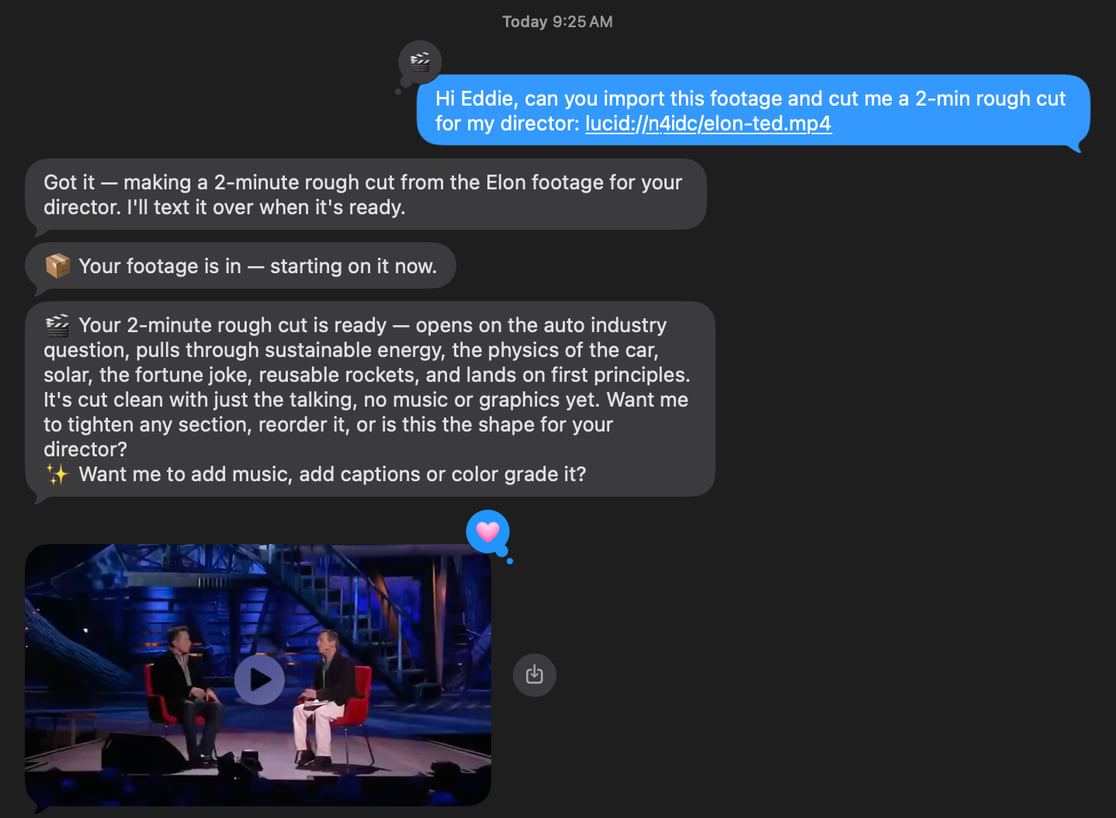
The end of Monday's shoot. The sunrise clips from Sunday's run. Whenever you have footage and nobody to hand it to, Eddie is awake.
Send footage straight from your camera roll to Eddie in iMessage, say what you want, and you get a real cut back as a video in the thread. Rough cuts, multicam, b-roll, captions, music. No app to open, no upload page, no timeline.
Text +1 650 444 9211 from your phone. Your first message puts you on the list; there is nothing to fill in.
Edit the transcript by hand
Select words in an edit's transcript and take them out. Select ones you cut and bring them back. Undo is there for every step.
It is a small thing that changes the rhythm of working with Eddie. Up to now, tightening a line meant asking for it in words and waiting for a run. A stray "um" that the filler pass did not catch, a sentence that reads better without its first three words, a name said twice — these are things you can see, and now they are things you can simply fix, with the cursor, in the place you noticed them.
Two details worth knowing. It applies to that one edit, so a project's other edits are untouched. And it is free: there is no run, no credits, no waiting. The MP4 you download afterwards is cut on exactly the word boundaries you chose.
Transcripts and speakers → · Filler and silences →
Audio on its own: podcasts, interviews, voice memos
Bring in a podcast recording, an interview capture or a voice memo with no video at all, and Eddie treats it as a full project. It transcribes it, builds the cut from the transcript, plays it back in the share view, and delivers it — as an MP4, or as a timeline in Premiere, Resolve and Final Cut, laid on the default sequence.
A pick of several audio files comes in as one project, and twenty audio formats are accepted end to end, including .aif, .opus, .caf, .m4b, .ac3 and .oga. If a file in your pick cannot be brought in, Eddie names that file. A recording that looks like a music track gets a suggestion to move it to the music library, where it is more useful.
This works on the web and in the desktop app from 4.0.20.
Build a cut from the passages you marked
If you already do your selects in a document — and a lot of people who work with interviews do — you can keep doing exactly that, and hand the result to Eddie.
Mark the passages you want in bold, italic or highlight, in RTF, DOCX, PDF or plain text. Drop the document into the project's Backgrounder. Then ask for a cut of just the parts you marked.
Eddie finds each marked passage in the real footage transcript and assembles them in the order you marked them. Where a passage cannot be placed with confidence, it says so, naming the passage by its position and its wording, so you can go and look at that one without re-reading the whole cut to find out what happened.
Backgrounders → · What you can ask for →
Set the level of one clip, one line or one speaker
Ask Eddie to raise, lower or mute the audio of a single clip, a single line, or every segment belonging to one speaker. The quiet guest. The one take with the air conditioning. The clip you want sitting under the music.
You can also take a segment's sound from a different synced file — the lav recorder in place of the on-camera mic, on a shoot where both were rolling.
The level you set plays in the share player, goes into the MP4, and is written as clip gain into your Premiere, Resolve and Final Cut exports, so it arrives in your edit suite as a value you can keep adjusting.
Segment audio levels → · Working with multicam →
Captions: a colour for each speaker, and anyone you want left out
Ask for a colour per speaker — "make speaker two yellow" — and it shows in the player, in the burned-in MP4 and in Final Cut Pro captions.
You can also leave words uncaptioned. By speaker, for an interviewer you want silent on screen. By source, for footage that already carries its own burned-in captions. Or by a single segment, when it is just the one. Excluded clips keep their place in the cut; only the caption is absent.
Both settings live on the caption track, so if you rebuild your captions they are still there.
Give your MP4 a size to fit in
Every platform has a ceiling, and finding out you are over it is usually the last step of the day.
Under the MP4 1080p row in the export menu there is now a "Limit file size" box. Put a number of megabytes in it and Eddie plans a single bitrate from the length of your edit, so the delivered file lands inside your limit. Ask for something below the quality floor and it tells you before anything starts, with the smallest size that does work.
Client notes, as markers on your timeline
A comment pinned to a moment of the cut in an Eddie review link now arrives in your export as a marker on the frame it was written against.
The marker name is the comment. Its note carries the author, whether the thread is open or resolved, and the replies underneath it. So the conversation that happened on the review page is readable inside the sequence, at the point it is about, without a second window open beside you.
This is carried by Final Cut Pro XML, by Premiere — both the .prproj and the .xml — and by OTIO. The export notes tell you how many markers were written, and name any comment that fell outside the sequence so nothing goes missing quietly.
Export to your NLE → · Sharing a project →
On the desktop, and on your phone
Five desktop releases this week, 4.0.17 through 4.0.21.
Paste a Frame.io share link. Drop a public Frame.io share link into the import flow and pull the footage straight in, with no account to connect and no browser step first. Shipped in 4.0.17, and in the iPhone app from 1.0.5.
Footage logs arrive as a built timeline. Send a footage log to Premiere Pro or DaVinci Resolve and it is created for you as a timeline through each application's own extension, ready to work in the moment it appears. Shipped in 4.0.18.
Rename and delete edits from the edit list. The pencil and the trash in the sidebar do what they look like they do, and an open share page picks the change up live. Shipped in 4.0.21.
Top up credits inside the prompt box. When a run stops for credits, the desktop prompt box now carries the same credit card and inline top-up the web has, and the run carries on where it was. Shipped in 4.0.21.
Frame-accurate Final Cut imports. Every clip starts on its declared frame and keeps its last frame. Shipped in 4.0.21.
On the iPhone, version 1.0.5 adds the Frame.io share-link import, puts suggested next steps above the message box, breaks captions at natural pauses, and shows shared projects as tiles you can browse.
The desktop app → · Eddie for iPhone →
Also landed
- Put a clip back, or reshuffle the picture. Restore segments you removed from an edit, at a position you choose. And rearrange which shots are seen while the sound plays straight through underneath — a montage or a cutaway over one continuous take. Both are free and undoable. (The editor explained →)
- Correct a clip's metadata when it is wrong. Eddie reads start timecode, frame rate and frame size off your footage already. Where a proxy carries the wrong ones, you can set the true values yourself, and your NLE export declares those, so clips relink to the full-size originals on the right clock. Clip positions stay in real seconds of the file: the correction is for relinking, not a retime. (Clip metadata → · RAW footage →)
- Crop to the person you name. With two people in frame, say which one the vertical crop should follow. You can also ask for a cut built only from shots where a named person is visibly on camera. (Crop and reframe →)
- A short audio crossfade at the cuts, so the sound joins smoothly through a tightened section. (Music and audio →)
- Add a reference video to the Backgrounder from a pasted YouTube link, when the easiest way to say what you want is to point at something. (Backgrounders →)
- Refer a friend, 250 credits each. Copy your link from the credits menu. When a friend signs up through it and finishes a first import, 250 credits land with you and 250 with them, for up to ten friends. (Refer a friend →)
- Buy credits without losing your place. A credits button in the header opens the buy dialog, and when a run stops for credits the card itself carries the exact shortfall and a one-tap resume that continues the run you were in. (How credits work →)
Missed last week?
In case this is the first of these you have read, the headlines from the last round-up:
- Best in Show at IBC 2026, Amsterdam. The award is for the part of Eddie that professional editors care about most: it hands you a real project file, in the tool you already use, with your multicam intact. (Read the announcement →)
- Speed ramps, for everyone. Ask for a ramp into a moment and Eddie retimes the clip with proper acceleration. The ramp carries into Final Cut, Premiere, Resolve, OTIO and EDL, into the MP4 and the desktop render, and into the share view. (Speed ramps →)
- A real sound bed. Sound effects on request, a music lane that holds several cues, and a voice-over lane for your own recording or a script Eddie reads. (Music and audio →)
- Captions that stay off your speaker's face, in a cleaner typeface that covers far more languages, breaking at the cut. (Captions and subtitles →)
As always, just tell Eddie what you want and it will do it.
— The Eddie AI team