On this page
In Summary A vertical clip is three decisions: which 45 seconds, what shape the canvas is, and what part of the frame you keep. Eddie handles all three from a plain-language prompt, gives you a real 9:16 canvas with per-segment layouts, and bakes the crops into the FCPXML and Premiere XML as calibrated transforms. What it does not do is track anybody's face.
The short answer
Most "make a vertical clip" tools give you a square-ish crop of the centre of the frame and hope your subject stands still. That is fine for a talking head shot on a tripod at the centre of frame, and it is a mess for anything else.
The useful version has two halves. Finding the moment is a reading problem, which a language model is genuinely good at once it can see a transcript with timecode attached. Framing the moment is a geometry problem, which needs the real pixel dimensions of your footage, not an assumption that everything is 16:9.
Eddie splits it exactly that way, and both halves are free.
The footage in this walkthrough
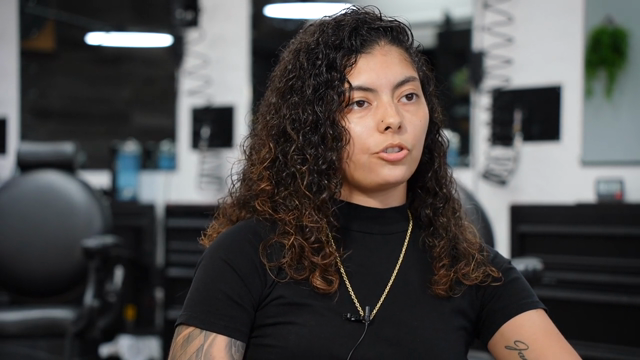
Three interviews with Jessica Hernandez and her daughter Alizé, who run Simply Men's Barbershop in West Chester, PA.
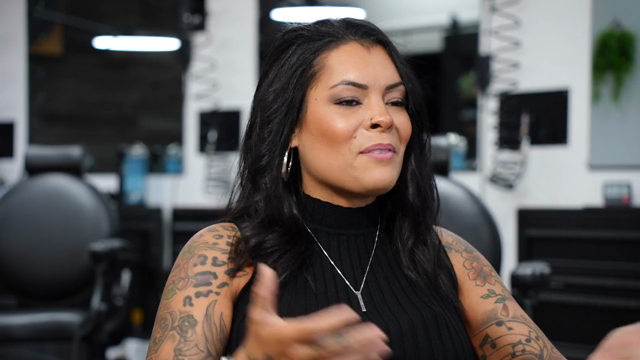
- 3 interviews, 8:20, 24:59 and 30:38, 1 hour 4 minutes total
- 13,675 words of transcript
- 3 speakers, plus interviewers, separated automatically
An hour of interview is around six to ten decent vertical clips, and the whole difficulty is that they are scattered across three files.
Step 1: Find the moment
Search the transcript rather than the timeline. You can look for a phrase inside one source without pulling the whole transcript back, which matters on a long podcast: the search returns matching segments with their index and timestamps.
In practice you ask for it in words:
Find the moment where Alizé talks about her first day cutting hair, and cut it as a 45 second vertical clip.
Prompts that work on interview and podcast footage:
- "Pull three clips that each make sense with no context."
- "Find the strongest 30 seconds about starting the business during covid."
- "Cut this so it opens on the sharpest line, not on the question."
The clip itself is built as an ordinary edit: soundbites in an order, which means you can argue with it afterwards.
Step 2: Give the edit a vertical canvas
This is where it becomes a real 9:16 piece rather than a letterboxed 16:9 one. The canvas is set per edit, from a preset (vertical 9:16, square 1:1, portrait 4:5, landscape 16:9) or from explicit pixel dimensions.
On the canvas you place video layers:
- V1 is the edit's A-roll spine and owns the audio.
- V2 is an optional second layer showing another camera angle at the same moment, visual only and muted.
Each layer takes a crop (which part of the source frame you keep) and a placement (where it sits on the canvas), both as normalised rectangles. That gives you the layout everybody actually wants from a two-camera podcast: the guest on the top half, the host on the bottom half, stacked, full bleed, no black bars.
Step 3: Get the aspect maths right, or let Eddie complain
The renderer maps your crop rectangle into its slot verbatim. It does not letterbox for you and it does not politely fix a mismatch, because either behaviour would silently change your framing. So a distortion-free layout has to satisfy:
(crop.w * sourceAspect) / crop.h == (placement.w * canvasWidth) / (placement.h * canvasHeight)
Two things stop this being a chore. First, Eddie returns the real per-layer source aspects with the result, and warns you when a layer's numbers do not line up. Second, and more important, you should never guess the source aspect: ask for it. Sources report rotation-aware display dimensions, so phone footage shot in portrait but encoded landscape reports as 2160x3840 with a rotation flag rather than lying to you at 3840x2160. Cinema cameras ship 1.9:1, not 16:9. Trust the reported dimensions, never the raw encode.
Step 4: Vary the layout by segment
A split screen held for 45 seconds is exhausting. The better shape is: full frame on whoever is speaking during their answer, split screen for the back and forth. That is a per-segment override on top of the edit-level layout, and an empty layer list on a segment means plain full-canvas V1.
This is the same idea as cutting angles on a landscape multicam edit, and it uses the same angle information. See how to cut a multicam interview or podcast automatically.
Step 5: Captions, then export
Vertical clips are watched muted, so captions are not decoration. The animated word-by-word style is the default and is built from the edit's own transcript. See how to add captions to a video automatically.
Then get it out:
- MP4 renders in the cloud from your original files with the crops, layout, captions and any music baked in. 1080p by default, or source quality up to 4K. Renders are capped at 10 minutes of output, which no vertical clip should ever hit.
- FCPXML and Premiere XML bake the canvas and every crop and placement as calibrated transforms, so the vertical framing arrives in your NLE as adjustable parameters rather than a burned-in picture.
- OTIO carries the layout as metadata.
- The DaVinci Resolve FCPXML flavour deliberately drops the layout and hands Resolve the classic full-frame cut. If your deliverable is vertical and you finish in Resolve, take the MP4 or rebuild the reframe in Resolve.
What it will not do
- Nothing here tracks a face. There is no subject detection and no auto-reframe. The model can look at real frames from your footage and choose a crop rectangle from what it sees, and that is a genuinely good static framing decision, but nobody is following your subject across the frame shot by shot. If your subject moves, keep the crop wider or set it yourself.
- It does not score clips for virality. It picks moments by reading what was said. It has no view on what the algorithm wants this week, and any tool that claims otherwise is guessing with more confidence than we are willing to.
- It will not rescue a wide two-shot. Cropping 9:16 out of a wide means throwing away most of your pixels. A 4K master survives this; a 1080p wide does not.
- Layouts do not reach Resolve. See above. This is a real limitation, not an oversight, and it is the reason to check your export target before you build the layout.
FAQ
Do I need a second camera for the split-screen layout? Yes. The V2 layer shows another angle of the same take, so it needs a real multicam group. One camera gives you a full-frame vertical crop instead.
Does the vertical layout cost credits? No. Setting the canvas, the layers and the crops is free, and so are the NLE exports.
Can I do this from ChatGPT or Claude? Yes, over the same MCP connector. See how to edit video with ChatGPT and how to edit video with Claude.
What if my podcast cameras were never grouped at import? Group them yourself with a reference camera and an offset per camera. It is free and it is covered in the multicam guide.
Can I get several clips out of one interview in one go? Yes. Each clip is its own named edit, with its own canvas, layout and captions.
The barbershop project ships inside Eddie, so you can build these clips on the same footage rather than trusting a screenshot. Open it and prompt it.