In Summary ChatGPT can edit your videos once you connect it to a video editor that holds the footage and its timing, such as Eddie. You then direct the cut in plain language. The chat cannot upload your files into Eddie, so you import them in Eddie first.
The setup takes two things: your footage imported into Eddie, and Eddie added to ChatGPT, either as the published Eddie plugin or as a custom MCP server. After that you type
@, pick Eddie, describe the video, and approve the edits ChatGPT asks to make. The cut exports as a timeline for Premiere Pro, DaVinci Resolve or Final Cut Pro.
The short answer
ChatGPT is good at the thinking around an edit: reading a long transcript, finding the story, ordering beats, writing a paper edit. Editing your own footage takes more than that. It needs a tool that holds the files and their timing, and can write a sequence your editing app opens.
So the useful question is not "can ChatGPT edit my video?" It is "what can I connect ChatGPT to?" ChatGPT reaches outside tools through the Model Context Protocol (MCP). Eddie is an AI video editor with an MCP server, so once it is connected, ChatGPT gives the direction and Eddie makes the cut in your Eddie project. That pairing is what people usually mean by a "ChatGPT video editor".
A pasted transcript vs. a connected editor
| Task | ChatGPT with a pasted transcript | ChatGPT connected to Eddie |
|---|---|---|
| Summarise the interview | Yes | Yes |
| Suggest a structure or write a paper edit | Yes | Yes |
| Find a line, topic or speaker in your footage | Only in the text you pasted | Yes, with timestamps |
| Look at frames to check a take | A transcript has no frames | Yes, on request |
| Build a cut and export it for Premiere, Resolve or Final Cut | You get a paper edit, a document | Yes |
Two points trip people up.
Pasting a transcript loses the link to the footage. ChatGPT will give you a good paper edit from pasted text. But a paper edit is a document. Turning it into a timeline means finding every chosen line in your footage by hand. With Eddie connected, ChatGPT works on the project's own transcript, so every choice keeps its source and timestamps.
The chat does not carry your footage into Eddie. Eddie's help center is plain about this: Claude and ChatGPT cannot upload your files, so you add footage in the Eddie web app or desktop app, then go back to your chat (Add your own footage when you work from Claude or ChatGPT).
Can ChatGPT make videos?
Making a new video and editing your own footage are different jobs.
- Generating video means creating new clips from a text prompt or an image. OpenAI's tool for this was Sora. OpenAI's own developer guide now says the Sora 2 models and Videos API were shut down on September 24, 2026, and keeps the page for historical reference (Video generation with Sora).
- Editing your video means choosing, trimming and ordering footage you shot. That needs a tool that holds your files and their timing.
The two can meet in one cut. Inside Eddie you can describe a shot and generate an original clip for an edit that is missing one. Eddie quotes the credits before anything is generated, the clip lands as b-roll, and it is marked as AI-generated on export. Your interview stays your real footage.
Step 1: Import your footage into Eddie
Do this first, once. Drag the files into the Eddie web app or desktop app, or bring them in from Google Drive, Dropbox, Frame.io or iconik. Each file is transcribed with speaker names during import. Nothing is edited at this stage. Import makes the footage searchable, it does not make a cut.
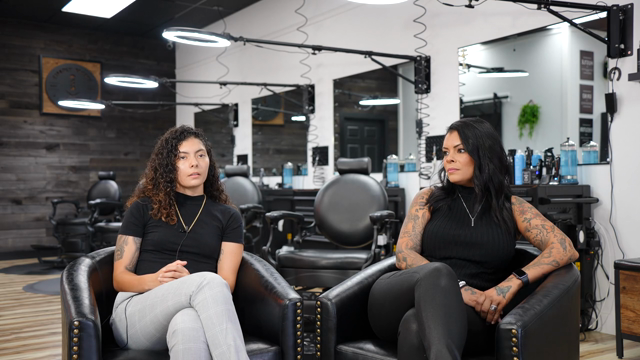
If you want to try this before using your own footage, the demo project inside Eddie has three interviews from a barbershop shoot, 1 hour 4 minutes in all. The prompts below were run on it.
Step 2: Add Eddie to ChatGPT
There are two routes. Try the first one.
Route A: install the Eddie plugin. In ChatGPT, open Plugins and find Eddie by Press Play Labs, Inc. Install it and complete the connection when prompted. You sign in with your Eddie account the first time. There is no token to paste. Availability depends on your plan, workspace and region.
Route B: add Eddie as a custom MCP server. This follows OpenAI's guide to adding a custom MCP server, on ChatGPT on the web:
- Go to chatgpt.com/plugins.
- Select the + button, then Add custom MCP server.
- Enter the name Eddie AI. Under Connection, enter the Server URL
https://mcp.heyeddie.ai/api/mcp. - Set up authentication. Eddie uses OAuth: ChatGPT finds Eddie's sign-in page and asks you to sign in with your Eddie account.
- Read the risk warning and select I understand and want to continue.
- Select Create as a plugin, then find it in your personal plugins and install it.
OpenAI says workspace permissions and security restrictions, including Lockdown, apply to adding and using custom MCP servers. If you are in a company workspace and the option is missing, that is the likely reason. OpenAI's developer docs do not list which plans include this, so check what your own account shows.
If neither route is available to you, the same prompts work in Eddie's own web app, or in Claude (see how to edit video with Claude). Our install page keeps the connector details current.
Step 3: Start a chat and ask for the edit
Start a new conversation, type @ in the prompt box and select Eddie. OpenAI's guide also says you can steer which tool ChatGPT picks by naming the app and the tool, and by saying what to do when apps overlap. In practice, start the prompt with "Use Eddie to…" if you have several plugins connected.
The prompt we used on the demo footage:
Use Eddie to create a story about Alizé's journey as a female barber in a mostly male field.
There are no timecodes or clip names in that prompt. The transcript does that work. Prompts that work on interview footage:
- "Find every moment where they talk about opening during covid."
- "Cut a 90-second version and tighten the pacing."
- "Start with the strongest line in the whole shoot."
Vague prompts ("make it cinematic") work badly. Say what the video is for and who will watch it. Our help article on prompting Eddie has more.
Step 4: Expect approval prompts
This is the part ChatGPT users ask about most. For a custom MCP server, OpenAI's guide says write actions need your confirmation by default, and ChatGPT treats any tool not marked read-only as a write action. So when Eddie is about to create or change an edit, ChatGPT asks you to approve it.
- You can review the input before approving, and inspect the full input and output of each call.
- You can tell ChatGPT to remember your decision for that tool in the current conversation. A new or refreshed conversation asks again.
- Some Eddie steps that cost credits ask twice in their own way: the first call returns the price and changes nothing, and a second call with your confirmation does the work. Placing b-roll over an interview and searching the picture for moments both work like this.
None of this is a fault. Approve the steps you meant to ask for.
Step 5: Give notes, finish, export
Treat the first cut as an assistant editor's first pass. Play it, then reply with notes: "The opening is slow, start on the line about her first day." "Cut 20 seconds." "You used the same story twice, keep the better take." Earlier versions of an edit are kept, so you can ask to go back to one, or undo the last change.
When the structure holds, ask for the finishing passes in the same chat:
- Captions from the transcript's word timings, in a chosen look. See captions and titles.
- B-roll from your project's b-roll library, placed over the interview.
- A vertical version, with the canvas set to 9:16 for social clips.
- A review link, so a client can watch the cut and leave notes at the timecode without an Eddie account.
Then export a timeline, not just a video: Final Cut Pro, DaVinci Resolve, a native Premiere Pro project, Premiere XML or OpenTimelineIO, or a cloud-rendered MP4. Timeline exports and renders use credits. The Premiere Pro, DaVinci Resolve and Final Cut Pro workflows cover relinking to your camera originals.
What it will not do
- It does not replace watching the cut. The edit is driven by the transcript. Eddie can pull frames on request, but you still check focus, framing and what is happening in the background.
- Dialogue footage works best. Interviews, talks and podcasts give the transcript something to work with. Silent b-roll montages take much more steering.
- It is a first cut. Colour, sound mix and the last pass of taste still happen in your editing app. That is why the timeline export matters more than the MP4.
- The chat cannot carry your footage. Import in Eddie first, every time.
FAQ
Can ChatGPT edit videos?
Yes, once it is connected to a video editor that holds your footage, such as Eddie. ChatGPT then directs an edit of footage you have imported into Eddie, and you finish it in your editing app.
Can ChatGPT edit videos for me?
Yes, once your footage is in Eddie and Eddie is added to ChatGPT. You describe the video, approve the edits ChatGPT asks to make, and get a timeline you can play, give notes on and export.
Is there a ChatGPT video editor?
What people call a ChatGPT video editor is usually ChatGPT connected to an editing tool through MCP. The Claude and ChatGPT page shows how Eddie connects.
Can ChatGPT make videos?
Making new footage is a different job from editing yours. OpenAI's developer guide says its Sora 2 models and Videos API were shut down on September 24, 2026. Inside Eddie you can generate an original b-roll clip for a cut, with the credits quoted first.
Can I upload a video to ChatGPT and have it edited?
Not through Eddie. The chat cannot upload your files into Eddie, so import your footage in the Eddie web app or desktop app, then ask in ChatGPT. ChatGPT then works on the project, not on a file in the chat.
Why does ChatGPT keep asking me to approve Eddie's actions?
For custom MCP servers, OpenAI asks you to confirm write actions by default. You can remember the decision for a tool within one conversation. A new conversation asks again.
Do I need a paid ChatGPT plan?
OpenAI's developer docs do not list which plans include this. The Eddie plugin's availability depends on your plan, workspace and region. If you cannot add Eddie, use the Eddie web app or Claude.
ChatGPT or Claude for this?
Both connect to the same Eddie project. In Claude you add Eddie as a custom connector; see how to edit video with Claude. For interview-only work, how to edit interviews with ChatGPT is shorter, and how to edit a podcast with ChatGPT covers multicam shows.
What happens to my original camera files?
Nothing. The edit points to them and the timeline export relinks to them, so you finish in Premiere, Resolve or Final Cut with your real media.
Sources
- OpenAI, Add custom MCP server, checked 2026-11-04
- OpenAI, Connect and test your plugin, checked 2026-11-04
- OpenAI, Video generation with Sora, checked 2026-11-04
- Eddie help, Use Eddie from Claude, ChatGPT, Codex, Cursor or any MCP client
Want to try it on the barbershop footage first? It is the demo project inside Eddie: open it and prompt it.