
Related tutorial.
Full tutorialSupplemental tutorial · Release compatibility unconfirmed. Follow the written steps for Premiere Pro 26.5.2.
THE SHORT ANSWER
Here's the approach.
Paper Edit in Premiere 26.5.2 assembles a rough cut from the transcript selections you choose. You still decide which lines tell the story.
Step by step.
Premiere Pro 26.5.2- 01
Choose your lines
Open the Text panel, select Paper Edit and highlight the sentences or sentence fragments you want.
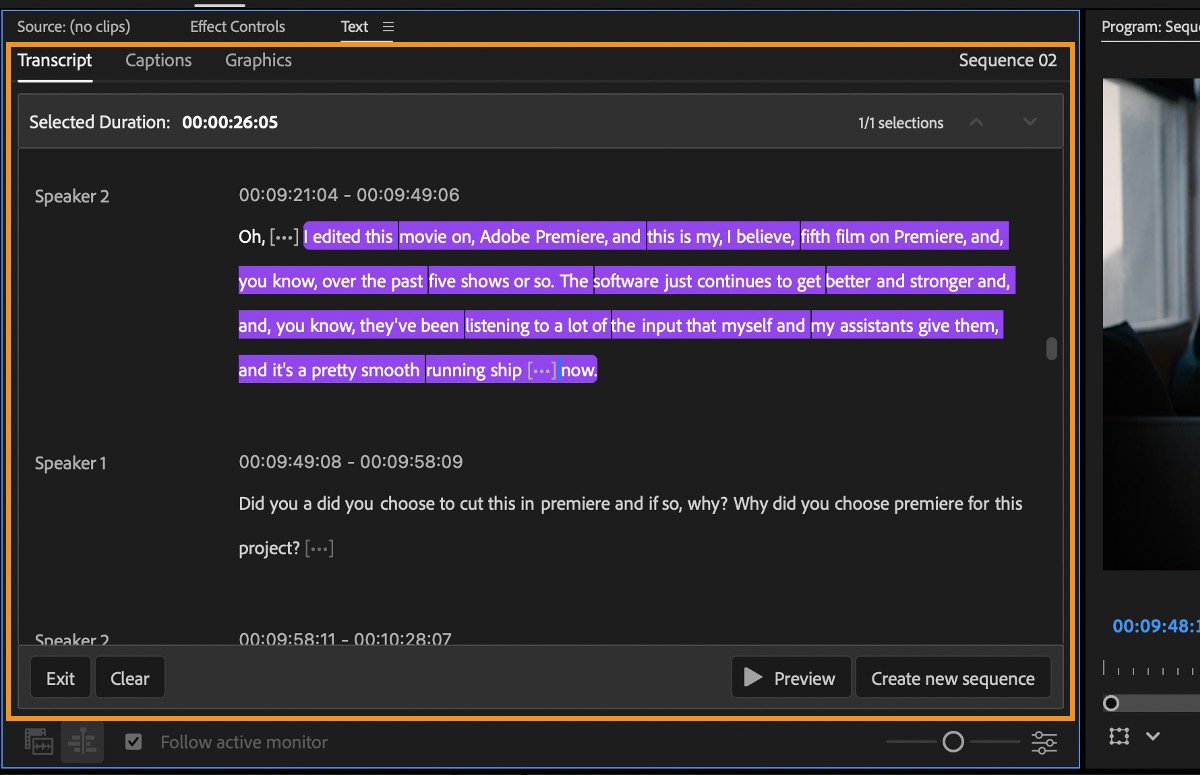
Select transcript passages, preview them, then create a sequence.Adobe Help reference - 02
Preview the selection
Check the selected duration and choose Preview. Use Clear if you want to start again.
- 03
Build the sequence
Choose Create new sequence, then refine pacing and transitions in the timeline.
Sources & version notes
Written for Adobe Premiere Pro 26.5.2. Menu names and available features can differ in other versions.
Version reference: Premiere Pro 26.5.2