In Summary
Pick soundbites in story order before opening the NLE.
It costs less to move a paragraph than a clip.
Eddie collapses the read → pull → arrange → assemble loop into one prompt.
Try it on your next interview cut. Worst case you spend an extra hour up front and you don't paper edit your next one. Best case you get half your week back.
If you cut interview-driven work — docs, branded mini-features, founder interviews, podcasts with B-roll — the most expensive part of the edit isn't the edit. It's the first pass. The one where you scrub through five hours of footage trying to remember which soundbite said what, before you've made a single cut.
The fix is older than NLEs: a paper edit. Pick the soundbites and put them in order before you touch the timeline. Then assemble.
This post is a practical walkthrough — how to do a paper edit by hand, and how Eddie does it for you in minutes.
What a paper edit actually is
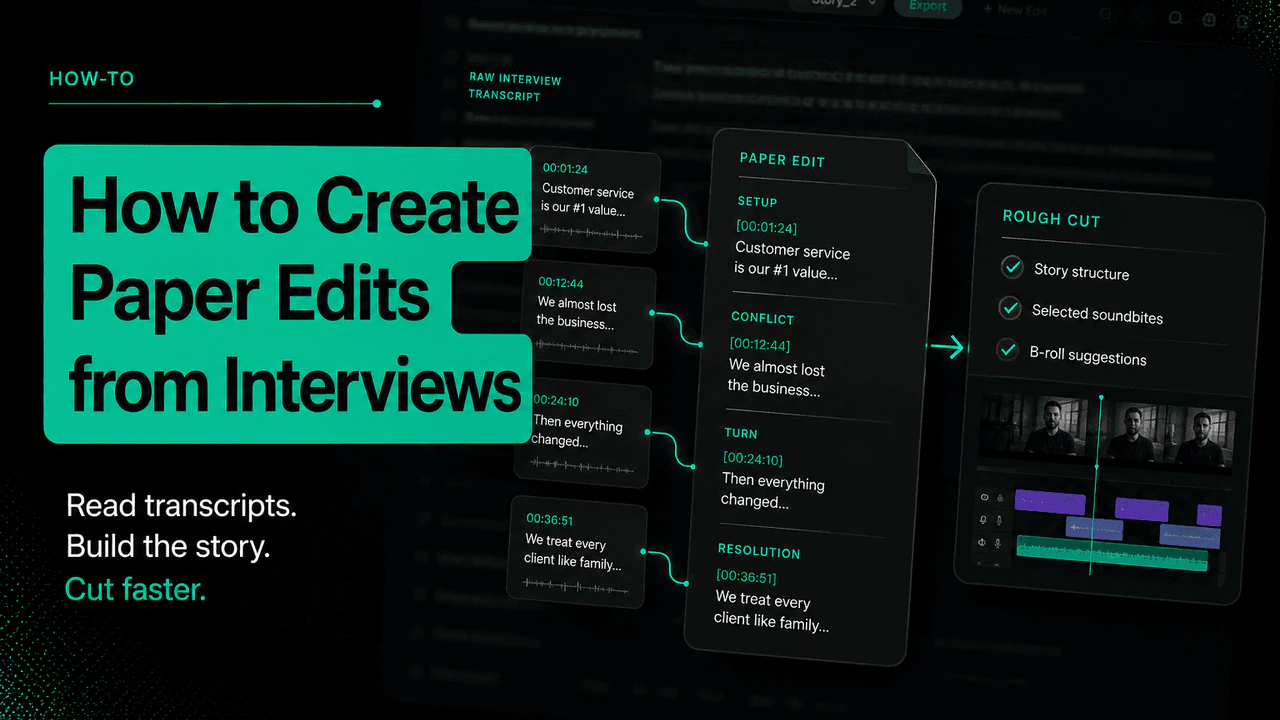
A paper edit is a text document that lists, in story order, the interview soundbites that will form the spine of your cut. For each beat you note:
-
Source — clip name + timecode in/out
-
The line — verbatim transcript of what the subject says
-
Why it's here — what story beat it serves
-
B-roll cue (optional) — what you'll cover this with
That's it. No timeline, no proxies, no sequence settings. Just the spine, on paper.
The point: by the time you open your NLE you already know what's making the cut. The assembly becomes mechanical.
Why it saves so much time
Three reasons:
-
You skip the timeline scrub. You're reading transcripts, not scrubbing footage at 1x. Reading is ~3-5x faster than watching.
-
You make structural calls cheaply. Rearranging a paragraph in a doc costs nothing. Rearranging clips in a timeline costs ten minutes and a lost sync.
-
You catch holes before assembly. "We have no soundbite for the resolution beat" is something you'd rather know on Monday than Thursday.
Editors who paper-edit consistently report cutting their first-pass time roughly in half. The trade-off is the upfront read — which is the slow step most editors skip and then pay for later.
The manual workflow (the long version)
If you're doing this without tooling:
-
Get clean transcripts for every interview. Most modern tools (Premiere, Resolve, Descript, Whisper) will do this — burn an hour and get them all.
-
Read everything once. Don't pre-judge. Just read.
-
Pull soundbites into a doc — paste the transcript line with the clip name + TC. Tag each one with the story beat it serves (e.g. setup, conflict, turn, resolution).
-
Arrange the spine. Reorder soundbites until the story works on the page. Read it out loud. If it doesn't make sense in text, it won't make sense in cut.
-
Add B-roll cues in the gaps — "cover this with the workshop wide" / "intercut with the close-up of hands."
-
Now open the NLE. Build the assembly straight from the paper edit. You're not editing — you're transcribing your decisions.
For a 5-hour interview shoot, expect 3–6 hours of paper edit work. Feels slow. Saves a day on the back end.
What Eddie does
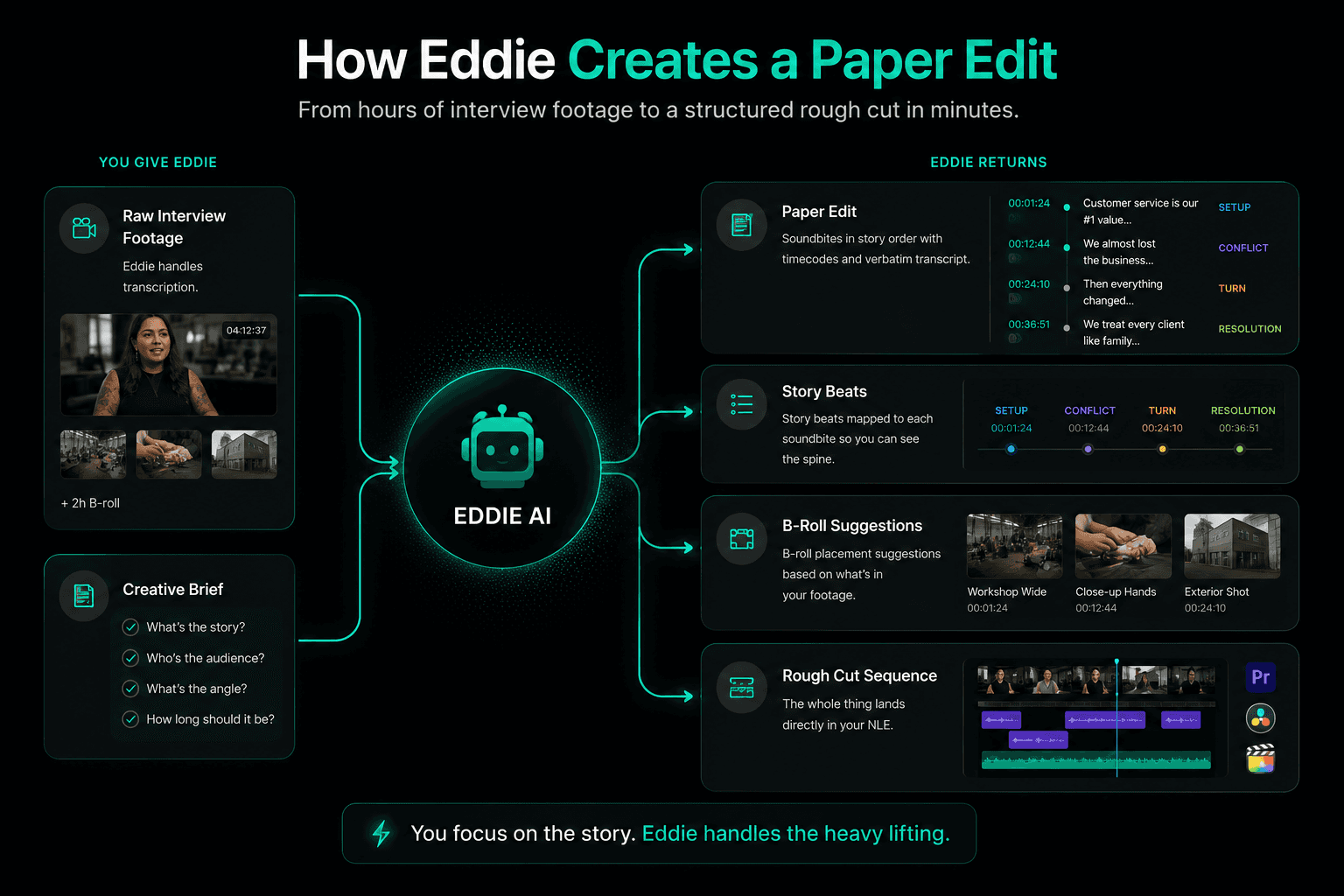
Eddie was built to compress steps 1–5 into one prompt.
You give Eddie:
-
The raw interview footage (Eddie handles transcription)
-
A short creative brief — what's the story, who's the audience, what's the angle, how long should it be
Eddie returns:
-
A paper edit — soundbites in story order, with clip/timecode references and verbatim transcript
-
Story beats mapped to each soundbite so you can see the spine
-
B-roll placement suggestions based on what's in your footage
-
The whole thing lands directly in Premiere / Resolve / FCP as a rough cut sequence
You review the paper edit, swap soundbites you don't like, send back to Eddie, iterate. The actual NLE assembly is already there when you're done — no transcribing decisions by hand.
The skill we're optimising is the editor's: deciding what story to tell. Everything mechanical around that should be automated.
A worked example
Say you're cutting a 6-minute brand doc from a single 4-hour subject interview + 2 hours of B-roll.
Without paper edit: import everything, scrub through interview at 1x while noting standout moments in a separate doc, build a rough sequence by hauling clips onto the timeline, realise the structure doesn't work, tear it up, rebuild. ~2 days.
With manual paper edit: get a transcript, read it, pull ~25 soundbites into a doc, arrange into a 6-minute spine, mark B-roll cues, then build the sequence from the doc. ~1 day.
With Eddie: feed footage + brief, get back a paper edit + assembled rough cut in the NLE in ~15 minutes. Spend 2–3 hours iterating on soundbite choices and story order. ~half a day.
The structural choices — what story you're telling, what gets cut, what soundbite lands the close — those still belong to you. The mechanical work of pulling them out of 4 hours of talking head doesn't.
When not to paper edit
A paper edit is overkill for:
-
Reels / short-form social where the cut is reactive to footage, not driven by spoken content
-
Music videos and montage-driven work
-
Anything where the story is in the visuals, not the voice
Paper edits are for talking heads telling stories — interviews, docs, founder content, podcast clips, sales videos. If most of your runtime is someone's mouth moving, paper edit.